Rectangle Alternatives: When Window Snapping Isn't Enough
Rectangle nails window snapping — and that's exactly why it can't fix the real problem: getting your whole project context back. Here's when to graduate from a snapping tool to a workspace manager.
If you're searching for a Rectangle alternative, you've probably already noticed something: every recommendation leads to another snapping tool. Magnet. Rectangle Pro. Moom. Stay. BetterSnapTool. They're all good. They all do the same thing.
And none of them will fix your actual problem.
TL;DR
ShiftPlus does what Rectangle cannot: it saves your entire project context — open apps, browser profiles, URLs, terminal environment, and macOS Space placement — and restores it instantly with a hotkey, even after a restart. If you're tired of rebuilding your work setup from scratch every time you switch projects, you don't need better snapping. You need a workspace manager.
What Rectangle is (and the ceiling you hit)
Rectangle is one of the best free utilities on macOS, full stop. Open source, keyboard-first, zero bloat. You press a shortcut and your window snaps to half the screen, a corner, a third, or fullscreen. That's the whole product, done exactly right.
Rectangle Pro adds a few extras: custom snap zones, window cycling, multi-step shortcuts, and a menu bar interface. It is still a snapping tool. So is Magnet ($7.99 on the Mac App Store). So is Stay ($15), which adds one valuable trick: it remembers which monitor each window belonged to and restores that layout when you plug your displays back in.
The ceiling you hit with all of them is the same: they move windows that are already open. They have no concept of projects, apps that aren't running, browser profiles, or "what I was working on before lunch."
After a restart, every one of them gives you a blank slate. A window snapper has nothing to snap until you've manually relaunched Terminal, opened your editor, pulled up four browser tabs, and re-navigated to the Slack channel you were in. At that point the snapper does its job. But the ten minutes of setup? That's on you, every single time.
That ceiling is not a bug in Rectangle. It's the accurate scope of what it set out to solve. The problem is that many people searching for a "Rectangle alternative" have already outgrown snapping — they need context restoration, not better keyboard shortcuts.
Snapping tools vs workspace managers
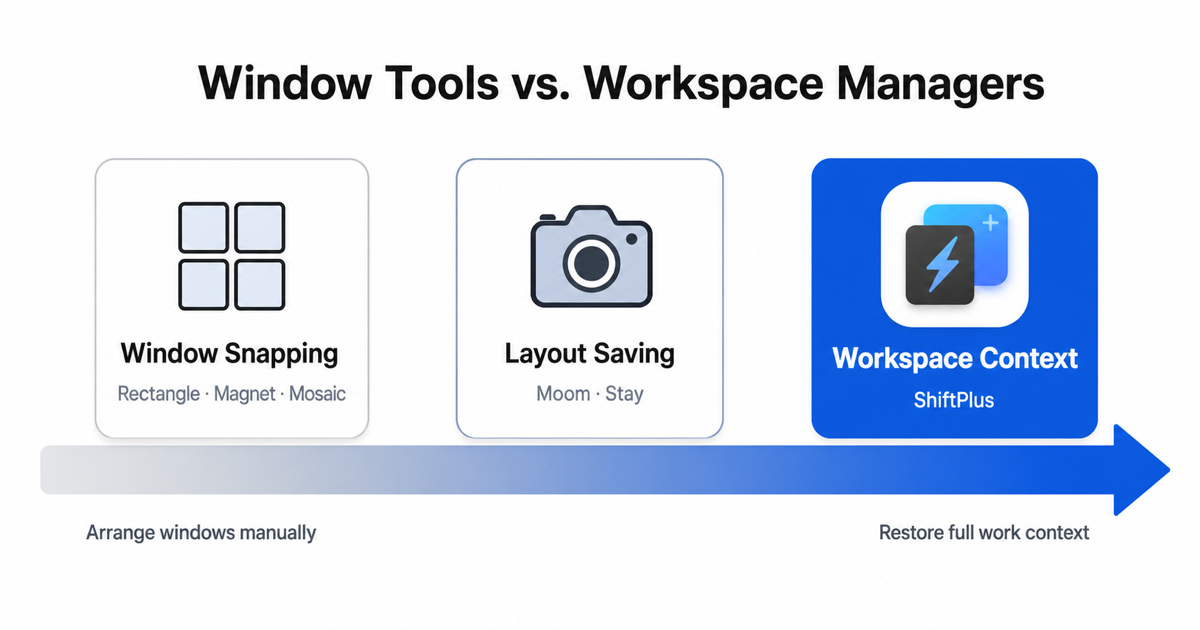
The distinction is worth making explicit before evaluating anything:
- Snapping tools (Rectangle, Magnet, Stay, Moom, BetterSnapTool) — position and resize windows that are already open. They operate on the current frame. No memory of what you were working on.
- Workspace managers (ShiftPlus, Spencer, Workspaces, Ikuna) — save a named project environment and rebuild it on demand. They operate on the entire session: which apps should be running, which browser profile is active, which URLs are open, where things live across Spaces.
| Capability | Rectangle / Magnet / Stay | Workspace manager (ShiftPlus) |
|---|---|---|
| Move & resize windows | ✓ | ✓ |
| Keyboard shortcuts | ✓ | ✓ |
| Save named layouts | — | ✓ |
| Restore apps & browser tabs | — | ✓ |
| Per-project browser profiles | — | ✓ |
| Survive a restart | — | ✓ |
| Sync across Macs | — | ✓ |
Notice that workspace managers typically include window arrangement — ShiftPlus places every app in its correct position on restore. So upgrading to a workspace manager doesn't mean giving up snapping. It means adding the layer above it.
The direct alternatives
These are the tools people most commonly end up comparing when searching for a Rectangle alternative. Each one is a fair upgrade within the same snapping category.
Rectangle Pro
The paid version of the same open-source codebase, made by the same developer. Adds custom snap zones you draw yourself, window cycling between preset positions, a multi-step shortcut system, and a menu bar UI. If your only complaint about Rectangle is that you want more snap configurations, Rectangle Pro ($9.99 one-time as of mid-2026) is the obvious next step.
Magnet
The most-downloaded paid window manager on the Mac App Store ($7.99). Magnet's keyboard shortcut coverage is broader than Rectangle by default, and it handles ultrawide monitors cleanly with thirds and sixths. No meaningful difference at the core job. Slightly more polished App Store integration if that matters.
Stay
Stay's distinguishing feature is display-set memory: it saves which window belongs on which monitor and restores that geometry when you reconnect your external display. If you work frequently between a laptop screen and a desk setup, Stay solves a real annoyance. It is not a workspace manager — it knows nothing about your projects — but it's the most practical snapper if disconnecting a monitor is your main pain point. For a detailed comparison of Stay and its alternatives, see the Stay app alternative guide.
Amethyst
An open-source tiling window manager for macOS, inspired by xmonad. Windows are arranged automatically using configurable tiling algorithms (tall, fullscreen, 3-column, etc.) rather than snapping by keyboard command. Amethyst suits people who want their screen to always be fully utilized and don't mind learning its layout model. Requires a different mental model from Rectangle but is free and genuinely powerful for keyboard-centric workflows.
None of these tools addresses context switching. If your problem is "I spend too long rebuilding my desk every time I change projects," read on.
The category upgrade: ShiftPlus
ShiftPlus is a macOS workspace manager built specifically for the context-switching problem. Instead of moving windows, it remembers entire project environments and switches between them with a single hotkey.
What a ShiftPlus workspace contains
When you create a workspace in ShiftPlus, you define:
- Which apps to launch — and which to close or hide from the previous workspace
- Which browser profile to activate — Chrome, Safari, Arc, Brave, Edge, and other Chromium-based browsers all supported. Switching from a "Client A" workspace to a "Client B" workspace changes the active Chrome profile, so cookies, logins, and extensions stay isolated by default
- Which URLs to open — not just raw tabs, but deeplinks: Slack drops into a specific channel, VS Code opens a specific project folder, Spotify opens a playlist, Linear opens a specific team view
- Terminal environment — per-workspace shell variables and AWS profile so
AWS_PROFILE=client-ais already set when the terminal opens; no manualexportrequired - macOS Space placement — each app can be assigned to a specific Space; on restore, ShiftPlus moves everything into position without any dragging
Hotkey switching
Every workspace gets a global hotkey. Press it and ShiftPlus closes or hides the previous project's apps, launches the new ones, switches the browser profile, loads the URLs, and arranges the windows — typically in a few seconds. No clicking through a launcher, no manual navigation.
iCloud sync across Macs
On the Pro (2 Devices) plan, your workspace definitions sync via iCloud. Sit down at a second Mac and the same workspaces are ready, with window positions recomputed for the local screen geometry. What you defined on a 4K iMac adapts to a 13-inch MacBook without any manual adjustment. See the full picture in the best macOS workspace manager roundup.
Pricing
ShiftPlus is a one-time purchase: $24 for a single Mac, $39 for two Macs with iCloud sync (prices as of July 2026). A 14-day full-feature trial requires no credit card. For a deeper look at what the restore actually covers, the save and restore window layout guide walks through the mechanics.
Can you run Rectangle and ShiftPlus together?
Yes — and many users do. They're not competing tools; they operate at different layers.
ShiftPlus handles the workspace level: which apps are open, which browser profile is active, where everything lives across Spaces. Rectangle (or Magnet, or Moom) handles the window level: snapping individual windows to halves, thirds, or custom zones within a session.
A typical combined workflow looks like this:
- Press the ShiftPlus hotkey to switch into "Client Work" — apps launch, browser profile switches, URLs open, windows land in their assigned Spaces.
- Use Rectangle shortcuts to fine-tune a specific window mid-session — snap the documentation to the right half, put the editor on the left.
ShiftPlus doesn't care what happens to windows after it restores a workspace. Rectangle doesn't know anything about which project you're on. Neither tool steps on the other.
If you already use Rectangle and love it, keeping it alongside ShiftPlus costs nothing and loses nothing. You just stop rebuilding your projects from scratch. For a similar look at this layering in the context of another popular snapper, see the Moom alternative guide.
FAQ
Is Rectangle still free?
Yes. Rectangle (the open-source version) is and has always been free on rectangleapp.com. Rectangle Pro is a paid upgrade ($9.99 one-time as of mid-2026) with additional snap configurations and keyboard shortcut features. The free version covers the core snapping use case completely.
What's better than Rectangle for multiple projects?
If your real problem is switching between multiple projects — not moving windows within one session — a workspace manager is the right category. ShiftPlus, Spencer, and Workspaces all operate at the project level rather than the window level. ShiftPlus specifically covers browser profiles, terminal env, and multi-Mac sync if those are part of your workflow.
Do I need a window manager or a workspace manager?
A window manager (Rectangle, Magnet, Stay, Moom) is right if your problem is: "my windows end up in random places and I want keyboard shortcuts to arrange them quickly." A workspace manager is right if your problem is: "I spend too long reopening apps, resetting browser profiles, and rebuilding my layout every time I switch what I'm working on." The two tools can coexist — most power users run one of each.
Does ShiftPlus replace Rectangle?
It depends on your workflow. ShiftPlus restores window positions as part of workspace switching, so you may find you need Rectangle less. But if you like snapping individual windows mid-session with keyboard shortcuts, there's no reason to stop using Rectangle. They sit at different layers and don't conflict.
ShiftPlus is free to try for 14 days — no credit card required. Download the trial to see whether workspace-level switching solves the context problem that snapping can't.