ShiftPlus vs Workspaces: A Modern macOS Productivity Comparison
macOS users looking to improve productivity often turn to workspace automation apps. Compare ShiftPlus and Workspaces to see which modern workspace tool is right for you.
macOS users looking to improve productivity often turn to workspace automation apps. Two names that frequently come up are ShiftPlus and Workspaces.
At first glance, both apps aim to solve a similar problem: launching your working environment faster.
But once you start using them, the differences become very clear.
This article compares ShiftPlus and Workspaces from a real-world, power-user perspective.
TL;DR: ShiftPlus is the best Mac workspace manager for developers who switch between multiple projects daily. One hotkey restores your full context — browser profiles, apps, terminal env, and window layout. Available on the Raycast Store. Workspaces only launches apps; it has no window management, no browser profile support, and no state-capture feature.
What Is Workspaces App for Mac?
Workspaces app for Mac (Workspaces.app) is an app launcher that groups apps, files, and URLs into named workspaces and opens them together with one click. You build a list — say, "Client Work": Chrome, Figma, Notion, a project folder — and Workspaces opens all of them when you activate that group.
Workspaces app for Mac does one job well: replacing the habit of manually clicking through your Dock every morning. It is not a workspace manager. It doesn't capture your current screen state, doesn't restore window positions, doesn't switch browser profiles, and has no concept of which macOS Space you're on.
What Workspaces app for Mac does:
- Opens a predefined group of apps, files, and URLs with one click
- Supports folder paths as launch targets
- Available on the Mac App Store as a one-time purchase
What Workspaces app for Mac does not do:
- Capture or restore window positions after quit or restart
- Switch browser profiles (no Chrome/Arc/Brave profile support)
- Manage macOS Spaces or virtual desktops
- Inject terminal environment variables (no AWS_PROFILE, no .env)
- Restore context after apps quit or Mac restarts
First Impressions Matter: UI & Experience
Workspaces
After trying Workspaces, one thing stands out immediately: the UI feels dated and cluttered.
- The interface does not feel clean or minimal
- Visual hierarchy is weak
- The overall experience doesn't feel "macOS-native" or premium
For an app you interact with daily, this matters more than people think.
ShiftPlus
ShiftPlus takes the opposite approach:
- Clean, modern, macOS-first design
- Minimal but intentional UI
- Feels like a native productivity tool, not a utility from another era
Advantage: ShiftPlus
Feature Comparison: ShiftPlus vs Workspaces
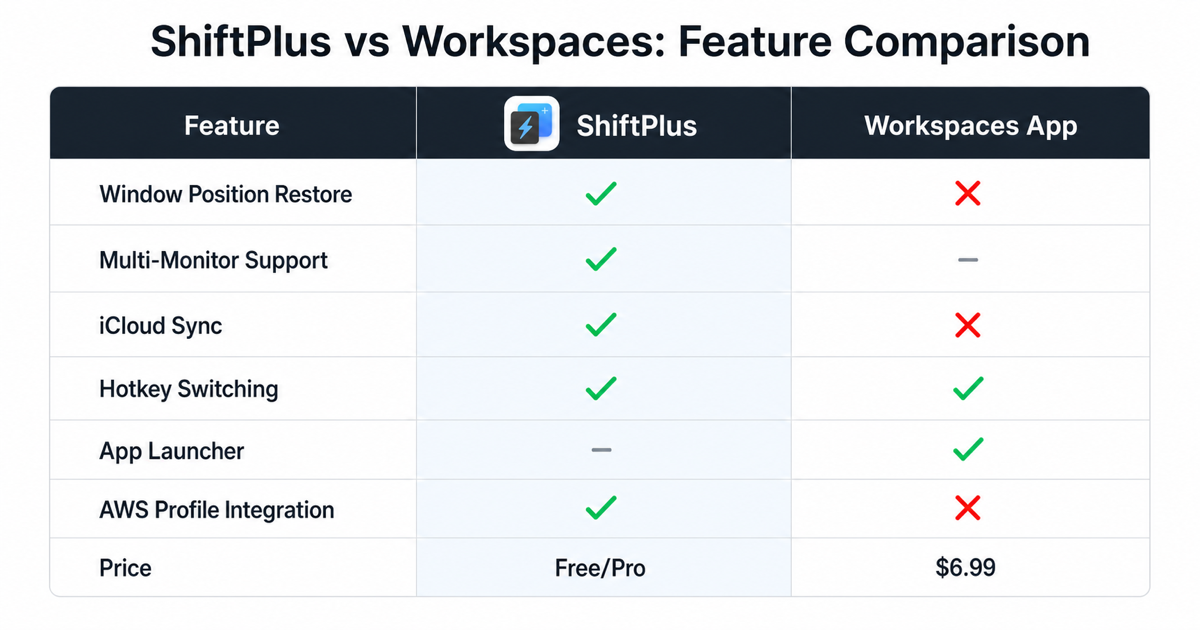
Here's a clear side-by-side comparison of what both apps actually do:
| Feature | ShiftPlus | Workspaces |
|---|---|---|
| Modern macOS UI | ✅ Clean & minimal | ❌ Feels outdated |
| App Launching | ✅ Yes | ✅ Yes |
| Window Management | ✅ Yes | ❌ No |
| Capture Current Setup | ✅ Yes | ❌ No |
| Restore Setup Later | ✅ Yes | ❌ No |
| Edit Workspace Profiles | ✅ Yes | Limited |
| Browser Profile Management | ✅ Chrome, Brave, Arc, Edge, and more | ❌ No |
| Power-User Workflows | ✅ Designed for it | ❌ Basic launcher |
Launching Apps vs Managing Workspaces
This is the core difference between the two products.
Workspaces
Workspaces focuses almost entirely on launching apps.
- Open apps
- Open files or folders
- That's essentially the scope
There is no concept of a "current setup":
- No capturing window positions
- No restoring an existing working state
- No understanding of context
ShiftPlus
ShiftPlus treats a workspace as a living environment, not just a launch list.
It supports:
- Capturing your current setup exactly as it is
- Restoring it later exactly as you left it
- Managing windows, apps, and context together
- Editing profiles to evolve with your workflow
This is a massive difference for developers, designers, and anyone doing deep work.
Clear advantage: ShiftPlus
Browser Profile Management: A Missing Piece in Workspaces
Modern workflows rely heavily on browsers.
ShiftPlus allows you to manage browser profiles, including:
- Chrome
- Brave
- Arc
- Edge
- Other Chromium-based browsers
This enables:
- Separate work and personal contexts
- Project-based browser sessions
- Fewer distractions and account conflicts
- Automatic profile switching per workspace
Workspaces does not support browser profile management at all.
For many professionals, this alone makes ShiftPlus the more complete solution.
Big advantage: ShiftPlus
Window Management: Precision vs None
ShiftPlus Window Features
- Smart window positioning across multiple monitors
- Capture exact window layouts with your setup
- Restore window states (minimized, maximized, exact positions)
- Multi-monitor support for complex desk setups
Workspaces Window Features
- ❌ No window management
- ❌ No position restoration
- ❌ No multi-monitor support
If you have a multi-monitor setup or care about precise window layouts, Workspaces simply doesn't deliver.
Advantage: ShiftPlus
Capture & Restore: The Game-Changer
This feature fundamentally separates the two apps.
ShiftPlus
- You arrange your perfect working setup (apps, windows, browser profiles)
- Click "Capture Current Setup"
- ShiftPlus records everything: open apps, window positions, browser profiles, and more
- Later, restore the entire environment with one click or hotkey
This means:
- Your workspace evolves naturally
- You can capture it at any point
- You can return to it exactly as you left it
Workspaces
- No capture functionality
- You manually build launch lists
- No restoration of window states
- No understanding of "current context"
For anyone with dynamic, evolving workflows, this is a deal-breaker.
Clear advantage: ShiftPlus
Who Is Workspaces Actually For?
Workspaces may be suitable if:
- You only want a simple app launcher
- Your workflow never changes
- You don't care about window state or context
- You have a single-monitor setup with basic needs
However, as soon as your workflow becomes more complex, its limitations show quickly.
Who Should Use ShiftPlus?
ShiftPlus is built for:
- Developers with multiple projects and complex setups
- Founders and makers switching between different roles
- Power users who value context over shortcuts
- Multi-monitor users who need precise window control
- Anyone with dynamic workflows that evolve over time
It's not just about launching faster—it's about working smarter.
Real-World Workflow Example
Let's see how each app handles a typical developer's morning routine:
Scenario: Starting Your Work Day
With ShiftPlus:
- Press your custom hotkey (e.g.,
Cmd + Opt + W) - Work Chrome profile opens with all your project tabs
- VSCode launches with your current project
- Slack opens to your work team
- Terminal opens in your project directory
- All windows snap to their exact positions across both monitors
- Total time: ~5 seconds, perfect state restored
With Workspaces:
- Open Workspaces app
- Select your app list
- Apps launch (but no window positioning)
- Browser opens, but default profile (wrong account)
- Manually arrange all windows
- Manually switch browser profile
- Manually navigate to project folders
- Total time: ~2-3 minutes + mental overhead
The difference compounds every single day.
Pricing Comparison
| Plan | ShiftPlus | Workspaces |
|---|---|---|
| Trial | 14-day free trial (full features) | Varies |
| License Type | One-time purchase | One-time purchase |
| Value | Complete workspace system | Basic app launcher |
ShiftPlus provides significantly more features for similar or better pricing.
The Verdict: ShiftPlus vs Workspaces
The comparison is straightforward:
Workspaces is a launcher. ShiftPlus is a workspace system.
If you only need to open a few apps, Workspaces might be enough.
But if you want:
- ✅ A clean, modern macOS experience
- ✅ Captured and restorable setups
- ✅ Window and context management
- ✅ Browser profile control
- ✅ Multi-monitor support
- ✅ Editable, evolving workspace profiles
- ✅ Deep app integration and customization
Then ShiftPlus is clearly the more advanced and future-proof choice.
Try Before You Decide
The best way to understand the difference is to experience it yourself.
ShiftPlus offers a 14-day free trial with all features unlocked—no credit card required. Test it with your real workflow, multiple projects, and daily context switches.
See if the time savings and mental clarity are worth it. For most power users, the answer is obvious within the first day.
Ready to stop wasting time on manual setup? Download ShiftPlus and try it free for 14 days and experience workspace automation done right.
Frequently Asked Questions
What is Workspaces app for Mac?
Workspaces app for Mac is a launcher that groups apps, files, and URLs into named workspaces and opens them together with one click. It's a Mac App Store app (one-time purchase) that accelerates your morning routine by removing the need to open apps one by one. It does not manage window positions, browser profiles, or macOS Spaces — that is the domain of a workspace manager like ShiftPlus.
Is Workspaces app for Mac worth buying?
Yes, if you only need an app launcher. If you want to restore your full working context — window positions across Spaces, the right browser profile, terminal env — Workspaces stops short. For a basic "open these apps for this project" use case, it does the job cleanly. For full workspace context switching, ShiftPlus covers what Workspaces can't.
Can I migrate from Workspaces to ShiftPlus?
Yes. ShiftPlus lets you capture your current setup or manually build workspace profiles from scratch. Simply arrange your ideal working environment once and use ShiftPlus to capture it — apps, windows, browser profiles, and all.
Does ShiftPlus work with Safari?
Yes. ShiftPlus supports Safari along with Chrome, Brave, Arc, Edge, and other Chromium-based browsers. Browser profile management is most powerful with Chromium-based browsers.
How many workspaces can I create in ShiftPlus?
Unlimited. Create as many workspace profiles as you need for different projects, clients, or contexts — there is no cap.
Does ShiftPlus require an internet connection?
No. ShiftPlus works completely offline. All workspace data is stored locally on your Mac; iCloud Sync is optional and queues changes when you are offline.
What if my workflow changes frequently?
You can capture your current setup at any time, or edit existing workspace profiles manually. Add apps, remove folders, update browser URLs, or change window layouts whenever your project evolves. Workspaces requires rebuilding your launch list from scratch.
Does ShiftPlus support multi-monitor setups?
Yes. ShiftPlus saves window positions as logical placements (left half, full screen, specific monitor) rather than absolute pixel coordinates, so the same workspace profile works correctly whether you are on a laptop screen, an external display, or both at once.