7 Moom Alternatives for Mac in 2026 (Beyond Window Snapping)
Moom is great at moving and zooming windows — but if you want your whole working context back (apps, tabs, Spaces, browser profiles), you need more than snapping. Here are the best Moom alternatives, honestly compared.
If you searched "Moom alternative" because Moom's price tag is off-putting, Rectangle is your answer and you can stop reading here — it's free, actively maintained, and matches Moom's snapping feature-for-feature. But if you're leaving Moom because window position management isn't actually the bottleneck — you want your whole context back, the apps, browser profile, Spaces assignment — then you're looking at a different category of tool, and the snapping comparisons won't answer your question.
This post covers both honestly: which tools beat Moom at snapping, and what none of them can do.
TL;DR
ShiftPlus does what Moom and every other window manager can't: it saves your full workspace context — open apps, browser profiles, macOS Spaces placement, terminal environment — and restores it on demand with one hotkey, even after a restart. For pure window snapping, Rectangle is the best free Moom alternative.
| Need | Best pick |
|---|---|
| Free snapping, Moom parity | Rectangle (free) |
| Polished App Store snapper | Magnet ($4.99) |
| Auto-restore per display config | Stay (free) |
| Snapping inside Raycast | Raycast (free) |
| Custom snap geometry | BetterSnapTool ($2.99) |
| Keyboard-driven auto-tiling | Amethyst (free) |
| Full workspace restore | ShiftPlus ($24 / $39) |
What Moom does well (and where it stops)
Moom has been around since 2011 and it earned its reputation. The hover-menu zoom button, keyboard shortcut snapping, and custom grid editor are genuinely well-designed — and unlike Apple's built-in tiling, Moom lets you define arbitrary column ratios. Saving a layout snapshot of the current window positions and re-applying it later puts Moom one step above pure snapping tools. For a stable single-display desk where you rarely quit apps, Moom is a defensible choice even today.
Where it stops: Moom manages window geometry, full stop. It doesn't know which app a window belongs to, can't launch apps that have quit, doesn't touch browser profiles, and doesn't restore terminal state or macOS Spaces assignments. Hit restart and a "saved layout" is a no-op — there are no windows to reposition yet. The tool is also $9.99 direct (or via Setapp), not free — and free alternatives now match it on raw snapping.
The alternatives at a glance
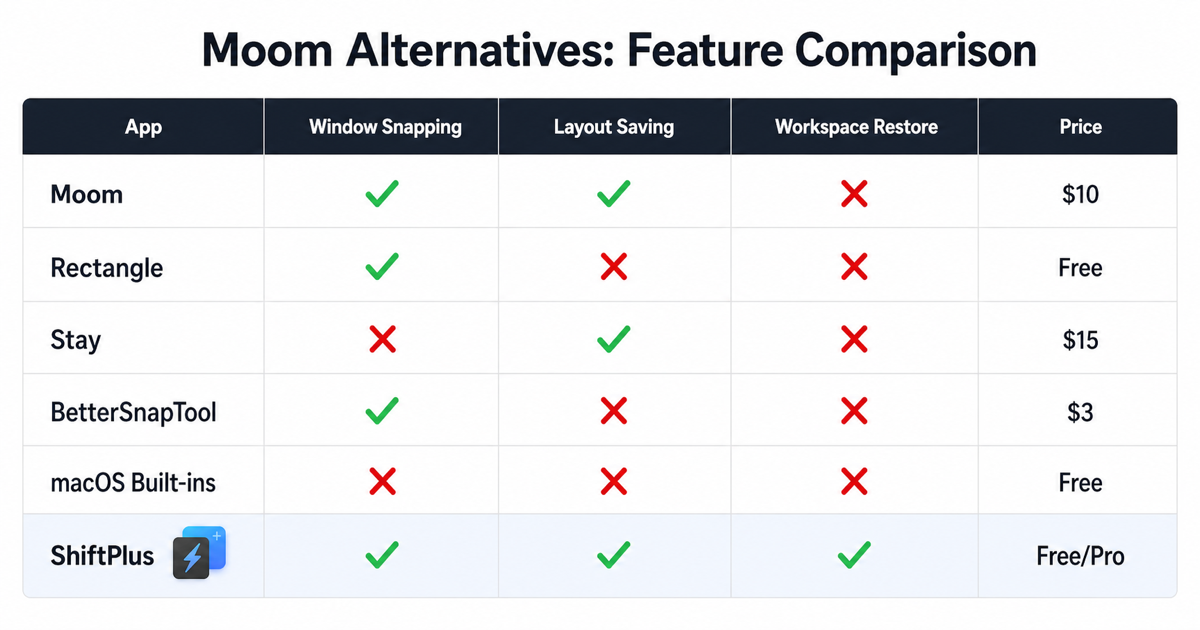
| App | Price | Window snapping | Layout snapshots | Full workspace restore (apps/tabs/Spaces) | Best for |
|---|---|---|---|---|---|
| Rectangle | Free | ✅ | ❌ | ❌ | Anyone wanting free, reliable snapping |
| Magnet | $4.99 | ✅ | ❌ | ❌ | App Store users, polished drag-to-snap |
| Stay | Free | Partial | ✅ per display | ❌ | Multi-monitor setups, auto window memory |
| Raycast | Free | ✅ | Partial | ❌ | Raycast users who want snapping built in |
| BetterSnapTool | $2.99 | ✅ | Partial | ❌ | Power users needing custom snap zones |
| Amethyst | Free | Auto-tiling | ❌ | ❌ | Developers who prefer keyboard-only tiling |
| ShiftPlus | $24 / $39 | ✅ | ✅ | ✅ | Context switchers needing full workspace restore |
Rectangle
If you're leaving Moom because it costs money, Rectangle is the obvious replacement. It is free, open source (MIT license), covers every snap zone Moom does — halves, thirds, quarters, corners, fullscreen — via keyboard shortcuts or drag zones, and ships with zero telemetry and zero subscription. Its keyboard shortcuts follow the Spectacle convention, which means existing muscle memory often transfers directly.
For most people who use Moom primarily for keyboard-shortcut snapping, Rectangle is a full functional replacement. The developer also offers Rectangle Pro ($9.99 one-time) with extras like window gaps, custom window cycling, and better Stage Manager integration — but even Pro doesn't restore workspaces.
The honest limitation: Rectangle is a window arranger. There are no saved named layouts, no app launching, no memory of what was open before a restart. It is an excellent tool that knows exactly what it is. If snapping is all you need from a Moom alternative, the search ends here.
Moom vs Rectangle Pro: is the upgrade worth it?
Rectangle Pro ($9.99 one-time) adds custom snap zones, window cycling, and multi-step shortcuts — closing the gap with Moom's grid editor. Whether it's worth the upgrade over the free version depends on one thing: do you need to define non-standard column ratios? If yes, Rectangle Pro's drag-to-draw snap zones beat Moom's grid approach for precision. If no, free Rectangle covers 95% of the same ground. Neither restores workspaces after a restart; that boundary is identical in both versions.
Verdict: For snapping parity with Moom, free Rectangle is enough. For arbitrary snap geometry, Rectangle Pro edges ahead. Moom's $9.99 price tag only makes sense if you're already in its ecosystem and don't want to switch muscle memory.
Magnet
Magnet ($4.99, App Store) is the most downloaded paid window manager on macOS, and its drag-to-snap responsiveness is the reason. Pulling a window to a screen edge feels snappier than either Moom's or Rectangle's drag implementation — a real difference for people who live on a trackpad rather than keyboard shortcuts. It supports halves, thirds, quarters, sixths, and fullscreen with no configuration required.
Magnet is sandboxed (App Store requirement), which means it plays well in managed environments and doesn't need accessibility workarounds beyond the standard permission. That constraint also defines its ceiling: no scripting hooks, no workspace-level features, no save-and-recall. It does snapping and nothing else — cleanly, reliably, with a one-time payment.
Moom vs Magnet: which is better?
Both cost roughly the same ($4.99 Magnet vs $9.99 Moom direct), both cover the core snapping shortcuts, and both stop at window geometry. The differences:
| Moom | Magnet | |
|---|---|---|
| Price | $9.99 direct / Setapp | $4.99 App Store |
| Custom grid editor | ✅ Drag-to-define ratios | ❌ Fixed halves/thirds/quarters |
| Layout snapshots | ✅ Save & recall current positions | ❌ No recall |
| Drag-to-snap responsiveness | Good | Very good (subjectively snappier) |
| App Store sandboxed | ❌ (direct purchase) | ✅ |
| Trackpad-first feel | Keyboard-biased | Trackpad-friendly |
Verdict: If you need to recall saved window arrangements, Moom wins — it's the only one with layout snapshots. If you want cleaner drag-to-snap on a trackpad and an App Store install, Magnet wins at half the price. For keyboard-shortcut-only snapping, both are equivalent; Rectangle is free and equally capable. Neither is a workspace manager.
Stay
Stay (free since August 2025, previously paid) solves a specific problem that Moom, Rectangle, and Magnet all ignore: it remembers which window was on which monitor in which position, and automatically re-places those windows when your display configuration changes — plugging in a dock, detaching from a monitor, or reopening apps.
Connect your MacBook to a two-display dock and Stay restores exactly the window arrangement you had the last time you used that configuration, without a single hotkey. Disconnect and go mobile and Stay remembers that layout separately. This automatic per-configuration memory is genuinely useful for hybrid workers and multi-monitor setups.
Stay's scope is deliberately narrow: it only repositions windows that are already open. It does not launch apps that have quit, does not manage browser profiles, and does not restore workspace context after a restart. Think of it as persistent window memory, not workspace management — and at free, it's worth running alongside any other tool in this list.
For a full comparison of Stay alternatives — including when to upgrade to a workspace manager — see the Stay app alternative guide.
Raycast window management
Raycast is a launcher and productivity platform, and window management is baked into its free tier. If you already use Raycast to launch apps, run scripts, or manage clipboard history, the window commands are immediately useful and can replace a dedicated window manager entirely — you get halves, thirds, quarters, fullscreen, and custom positioning via Raycast commands and keyboard shortcuts.
Raycast's Window Sets feature goes a step further: you save a named arrangement of app positions and recall it with a shortcut, similar to Moom's layout snapshots. Execution can be inconsistent across macOS point releases, but it's free and already installed if you're in the Raycast ecosystem.
The ceiling is firm: Raycast window management repositions the windows that are open right now. Window Sets are a snapshot of current positions — they don't survive app quits or restarts, and Raycast does not manage browser profiles or Spaces. Good for snapping with no additional install; not a workspace restoration tool.
BetterSnapTool
BetterSnapTool ($2.99, App Store) from the BetterTouchTool developer targets the power-user edge of window snapping: fully custom snap zones. You draw arbitrary screen regions as snap targets, so a 60%/40% left-right split, a narrow sidebar column, or an ultrawide-optimized three-pane layout is possible — not just the fixed halves and thirds most managers offer.
For multi-monitor setups with unconventional proportions — an ultrawide plus a portrait secondary, for instance — BetterSnapTool's custom geometry is more practical than Moom's grid editor. It also chains with BetterTouchTool gestures if you want to trigger snapping from trackpad swipes.
What it doesn't do: no app launching, no session memory, no browser awareness. At $2.99 it's hard to fault for what it is.
Amethyst
Amethyst (free, open source) occupies a completely different mental model: it is a tiling window manager, not snap-on-demand. Windows are automatically arranged in tiling layouts as you open them — tall, wide, fullscreen, bsp — and you navigate between them with keyboard shortcuts. You don't drag windows; the manager handles geometry continuously.
If you've used i3, bspwm, or xmonad on Linux, Amethyst will feel natural. It is the right tool for developers who want to eliminate mouse-based window management entirely. It pairs well with ShiftPlus for people who want automatic tiling within a workspace alongside workspace-level context switching.
Amethyst saves nothing. There are no named layouts, no workspace memory, no app management. It is a live display manager for the windows you have open at this moment.
If you want your whole workspace back, not just window positions
All seven tools above share the same fundamental boundary: they reposition whatever windows happen to be open right now. Close an app, restart your Mac, or switch projects — and you start from scratch, manually relaunching and rearranging everything.
ShiftPlus operates at the layer above. Rather than moving windows, it saves your full working context — which apps are open, which macOS Space each belongs to, which browser profile is active, which URLs are loaded, which terminal environment variables are set — and rebuilds that context from zero on demand, including after a restart.
Browser profiles. ShiftPlus opens Chrome, Brave, Arc, or Edge to a specific profile with preset tabs, not just a URL. If you consult for two clients who both use Google Workspace, the "Client A" workspace switches Chrome to Client A's profile; "Client B" switches to a completely different Chrome profile with different cookies, logins, and extensions. See the Chrome profile management guide for the mechanics.
macOS Spaces. ShiftPlus pins each app to a specific Space on restore — code editor on Space 1, communication apps on Space 3 — without any manual dragging. This is something no window manager in this list touches. The save and restore window layout guide covers the full restoration sequence and its caveats (Stage Manager compatibility, the "Automatically rearrange Spaces" setting).
iCloud sync. The Pro 2 Devices plan ($39) syncs workspace intent across Macs via iCloud. Sit down at a different machine and the workspace is ready, with window frames recomputed for the new display geometry. The best macOS workspace manager comparison benchmarks ShiftPlus against Spencer, Ikuna, BetterStage, and Workspaces if you want to see how it fits in the broader landscape.
ShiftPlus is not a Moom replacement if all you want is snapping — Rectangle does that for free. It is for people who have already solved the snapping problem and lose time to manual context reconstruction every time they switch projects or machines. There is a 14-day full-feature trial, no credit card required.
FAQ
Is there a free alternative to Moom?
Yes — Rectangle is the strongest free alternative. It covers all the core snapping and keyboard shortcut features Moom offers, is actively maintained, and is open source. Amethyst is free if you prefer automatic tiling. Stay is also now free and uniquely solves the multi-monitor auto-repositioning problem that Moom doesn't address.
What's the difference between Moom and a workspace manager?
Moom is a window manager: it moves and resizes windows that are already open, and can snapshot current positions to re-apply. A workspace manager like ShiftPlus operates at a higher level — it launches apps that have quit, switches browser profiles, sets terminal environment variables, assigns apps to macOS Spaces, and restores the full context of a project even after a restart. Window management is one component of workspace management, not a synonym for it. See the ShiftPlus vs Workspaces comparison for a concrete breakdown of the difference.
Does Rectangle do everything Moom does?
Nearly everything on the snapping side, yes. Rectangle matches Moom's drag-zone snapping, keyboard shortcuts, and standard grid positions. Where it falls short: Rectangle lacks Moom's custom grid editor (drag-to-define arbitrary column ratios) and Moom's layout snapshot/recall feature. Rectangle Pro ($9.99) closes some of the gap. For the majority of users who use Moom primarily for keyboard-shortcut window snapping, Rectangle is a full replacement.
Which Moom alternative restores windows after a restart?
None of the traditional window managers do — including Rectangle, Magnet, Moom itself, Stay, or BetterSnapTool. Restoring windows after a restart requires the apps to actually relaunch, which is a workspace manager's job, not a window manager's. ShiftPlus saves your full context and rebuilds it from scratch after restart. The ShiftPlus vs Workspaces comparison explains how this restore-from-zero approach differs from simpler app launchers.
Moom vs Magnet: which should I buy?
Buy Magnet ($4.99) if you want the cleanest drag-to-snap experience on a trackpad, an App Store install, or just a lower price. Buy Moom ($9.99) if you need layout snapshots — the ability to save your current window arrangement and recall it later — or a custom grid editor for non-standard column ratios. If budget is no concern and you only want keyboard-shortcut snapping, toss a coin: both are excellent and both stop at window positioning.
Is Moom vs Rectangle Pro worth the comparison?
They're aimed at slightly different users. Rectangle Pro ($9.99) adds custom snap zones and window cycling to the free Rectangle codebase — it wins on snap zone precision. Moom ($9.99) wins on layout snapshots and the grid editor. If you already use free Rectangle and want more, Rectangle Pro is the natural upgrade. If you've never used either, try Rectangle (free) first — you may never need to pay for either. For workspace restoration after a restart, neither qualifies; see ShiftPlus.
Which Moom alternative is best for multiple monitors?
Stay is the best free option for multi-monitor setups specifically. It automatically remembers your window arrangement per display configuration — connect your external monitor and Stay silently restores the last layout you used with that setup, with no hotkey needed. For multi-monitor users who also want to restore apps, browser profiles, and Spaces after a restart, ShiftPlus handles all of that at the workspace level. Moom, Rectangle, and Magnet all let you manually snap windows on multiple displays but have no memory of which display each window belongs to.
Is Moom worth buying in 2026?
Only if you specifically need layout snapshots and a custom grid editor, and you're not price-sensitive. At $9.99 direct (or via Setapp), Moom's two differentiators over free Rectangle are: (1) saving named window arrangements and recalling them later, and (2) defining arbitrary column ratios via the grid editor. For everyone else — trackpad-first users, keyboard-shortcut-only snappers, or anyone wanting to restore full context after a restart — there's a better-fitting free alternative. If you're evaluating Moom for the first time in 2026, try free Rectangle first. If Moom's snapshot feature is genuinely part of your workflow, the $9.99 is justified.
Does Amethyst replace Moom?
No — they solve fundamentally different problems. Amethyst is an automatic tiling window manager: windows are continuously arranged in predefined layouts as you open them, and you navigate using keyboard shortcuts. Moom is a manual snap-on-demand tool: you move windows to positions you choose via keyboard shortcuts or drag zones. If you want to stop thinking about window placement entirely, Amethyst wins. If you want to control exactly where each window goes, Moom (or its free equivalent, Rectangle) is the right tool. Many developers run both: Amethyst for automatic tiling within a workspace, and a tool like ShiftPlus to switch between different workspaces that have different tiling configurations.