7 AeroSpace Alternatives for Mac in 2026 (Tiling, Snapping, and Workspace Restore)
AeroSpace is excellent at i3-style tiling, but not everyone wants a config file or virtual-workspace model. Here are seven honest alternatives, grouped by the job you actually need done.
AeroSpace is one of the best ways to bring an i3-style workflow to macOS. It automatically tiles windows in a tree, switches its own virtual workspaces without macOS animations, supports multiple monitors, uses a plain-text TOML config, and does not require disabling System Integrity Protection.
So why look for an alternative? Usually because one of those strengths is also the mismatch. You may want native macOS Spaces, a GUI instead of dotfiles, simple drag-to-snap, saved layouts, or a way to restore the contents of a project rather than continuously tile the windows already open.
Those are different jobs. This guide separates them instead of pretending every window tool is interchangeable.
TL;DR
| If you want... | Best AeroSpace alternative |
|---|---|
| Deep scriptable tiling with native Spaces control | yabai |
| Automatic tiling without maintaining a config file | Amethyst |
| Free, simple keyboard and drag snapping | Rectangle |
| Custom layouts you can save and reapply | Moom |
| Window commands inside an app launcher | Raycast |
| No third-party utility at all | macOS native tiling |
| Named projects restored with apps, profiles, URLs, and Spaces | ShiftPlus |
The short answer: choose yabai or Amethyst if you still want automatic tiling. Choose Rectangle, Moom, Raycast, or native macOS tiling if you want manual control. Choose ShiftPlus only if your real problem is rebuilding a full working context. ShiftPlus is not a drop-in AeroSpace tiler.
First, choose the layer you actually need
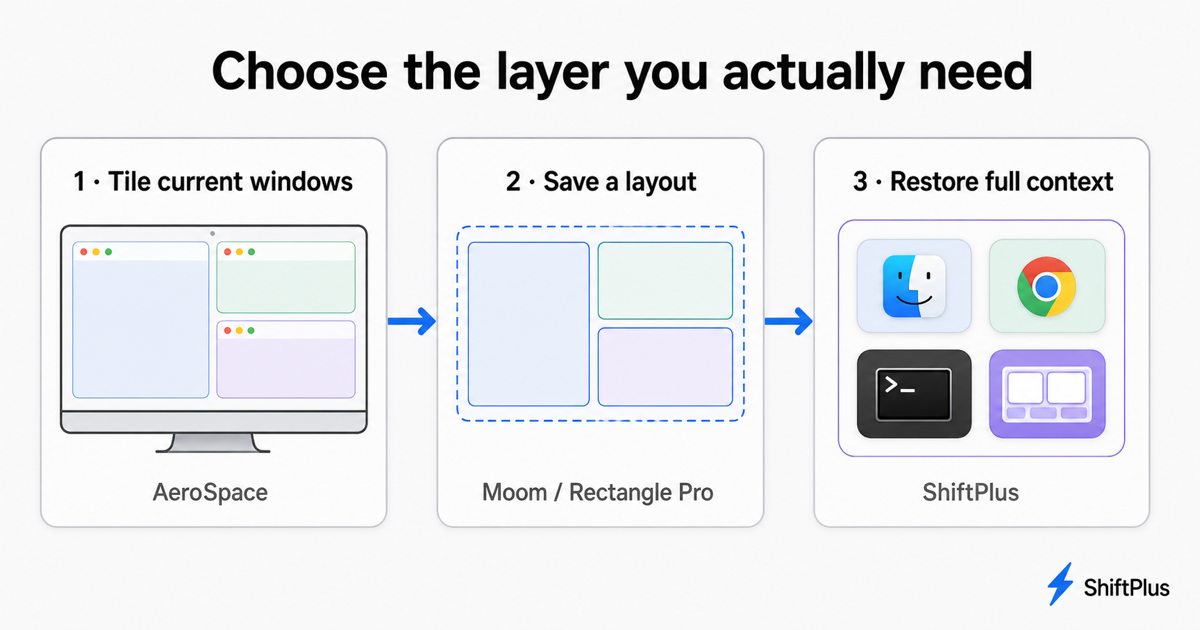
There are three layers that often get collapsed into “window management”:
- Tile current windows. A tool continuously fits open windows into a layout. AeroSpace, yabai, and Amethyst live here.
- Place or save a layout. You decide where current windows go, then optionally reapply those frames. Rectangle, Moom, Raycast, and macOS tiling live here.
- Restore full context. A tool launches missing apps and opens the actual project state: browser profile, URLs, terminal environment, and Space assignments. ShiftPlus lives here.
Moving up the list is not automatically better. A developer who wants every new terminal tiled instantly should use a tiler. Someone who changes clients six times a day may care less about perfect tiling than getting the right Chrome identity and project back.
AeroSpace: the benchmark
AeroSpace's defining feature is its tree-based, i3-inspired model. It creates fast virtual workspaces of its own instead of depending on native macOS Spaces, keeps configuration in a dotfile, exposes a CLI, and supports multi-monitor assignment. It is free and open source.
That makes it especially good for keyboard-first developers coming from Linux. It is a less natural fit if you want a visual setup flow, depend on native Mission Control behavior, prefer freely overlapping windows, or do not want to maintain configuration.
1. yabai — best for maximum scripting and native Spaces control
yabai is the closest alternative for an AeroSpace user who still wants a serious keyboard-driven tiler. It uses binary space partitioning, can apply layouts per Space, supports gaps and padding, and exposes commands for focusing, moving, swapping, resizing, and querying windows.
The biggest philosophical difference is Spaces. AeroSpace emulates its own workspaces; yabai integrates much more deeply with macOS windows, displays, and native Spaces. Its rules and signals also make it extremely programmable.
That power costs setup time. A complete workflow commonly pairs yabai with skhd for hotkeys and may require extra system configuration for advanced features. Choose it when you enjoy building your own environment and want macOS window automation as infrastructure, not as a polished GUI app.
Best for: power users who want tiling, scripts, rules, signals, and native Space operations.
2. Amethyst — best for automatic tiling with less configuration
Amethyst is a free, open-source automatic tiling manager inspired by xmonad. It ships with multiple ready-made layouts—Tall, Wide, Two Pane, three-column variants, and more—and lets you cycle layouts and move focus with shortcuts.
Compared with AeroSpace, Amethyst is easier to approach if you want tiling behavior without designing a TOML configuration first. Compared with yabai, it offers fewer low-level automation hooks. That middle ground is the point: install it, grant Accessibility permission, learn a small shortcut set, and let it arrange open windows.
Amethyst does not save project context or relaunch a named collection of apps. It manages the live windows in front of it.
Best for: people who want the benefit of auto-tiling without turning window management into a dotfiles project.
3. Rectangle — best free alternative for manual snapping
Rectangle is not an automatic tiler. It moves and resizes the focused window into halves, thirds, quarters, corners, or custom positions using keyboard shortcuts and screen-edge snap areas. The core app is free, open source, and supports Intel and Apple silicon Macs.
Rectangle is the right AeroSpace alternative when the automation itself is what you are leaving. Windows remain where you put them, overlapping is allowed, and nothing reorganizes because a new window appeared. You keep useful keyboard geometry without adopting a workspace tree.
Rectangle Pro adds custom sizes, snap targets, and more advanced multi-window actions, but its job remains window placement—not launching an absent app or rebuilding a project after restart.
Best for: anyone who wants predictable shortcuts and drag-to-snap with almost no learning curve.
4. Moom — best for custom placement and saved layouts
Moom is a polished manual window manager built around moving, zooming, snapping, custom grids, and saved window layouts. Unlike an auto-tiler, it waits for you to choose an arrangement. Unlike basic snapping tools, it can remember a group of window frames and apply that layout again later.
This makes Moom a good fit for a stable set of apps on a stable display setup. It is especially useful if you want precise custom geometry but find a tree-based tiler too opinionated.
The boundary matters: saved frames are not saved application state. If the app is closed, the browser is in the wrong profile, or the terminal needs a project-specific command, Moom does not reconstruct those pieces. See the detailed Moom alternatives guide for a broader snapping comparison.
Best for: people who want fine manual control and reusable arrangements of windows that are already available.
5. Raycast — best if you already use the launcher
Raycast includes window commands in the same keyboard launcher many Mac users already use for apps, files, snippets, and scripts. You can assign hotkeys to common positions without installing a dedicated window utility.
It is a practical alternative when you only used a fraction of AeroSpace: focus a window, press a shortcut, put it on the left, right, or another display, then continue working. Raycast's broader ecosystem is the differentiator—not deeper tiling.
Raycast Window Layouts can arrange a set of open windows, but that still differs from restoring an entire context after apps have quit. Our Raycast Window Layouts vs ShiftPlus comparison explains that boundary in detail.
Best for: existing Raycast users who want manual window actions in one command palette.
6. macOS native tiling — best if “good enough” is enough
Current macOS releases include native window tiling through the green window control, keyboard commands, and drag zones. For a simple two-up or four-window layout, the built-in option may remove the need for another process running in the background.
Native tiling is intentionally limited. It is not an i3-like tree, has no dotfile, offers fewer custom ratios, and does not provide named project contexts. But zero installation, familiar system behavior, and compatibility across managed Macs are real advantages.
Best for: casual use, locked-down work machines, and anyone who only needs a few standard positions.
7. ShiftPlus — best for restoring projects, not auto-tiling
ShiftPlus should only be on your shortlist if “AeroSpace alternative” actually means “I need to switch between complete work environments.” It does not continuously retile each new window and is not a replacement for AeroSpace's i3 keybindings.
Instead, a ShiftPlus workspace can store the apps, specific files and URLs, browser profile, terminal environment variables, macOS Space placement, and window arrangement for a named context. Trigger the workspace and it rebuilds those pieces—even after a restart, when there are no existing windows for a conventional window manager to move.
That model fits freelancers moving between clients, developers switching repositories and AWS accounts, and remote workers who use different app sets for meetings and deep work. If you only need geometry, choose a window manager. If you repeatedly reconstruct context, see how automatic macOS workspace restore works.
ShiftPlus can also complement a tiler. Use AeroSpace, yabai, or Amethyst to control live window behavior; use ShiftPlus to launch and restore the contents that should exist in a workspace.
Best for: named contexts that need to survive app quits, restarts, and project switches.
Which alternative should you choose?
- Choose yabai if you want more scriptability and deeper native Space control.
- Choose Amethyst if you want automatic tiling with less configuration.
- Choose Rectangle if you want free, manual snapping.
- Choose Moom if custom grids and reusable window layouts matter.
- Choose Raycast if window placement is one small part of your launcher workflow.
- Choose native macOS tiling if standard positions are enough.
- Choose ShiftPlus if the missing piece is full project context, not tiling.
For a broader category map, compare the best macOS workspace managers in 2026 or read the complete guide to saving and restoring window layouts on Mac.
FAQ
What is the best free AeroSpace alternative for Mac?
Amethyst is the easiest free alternative if you still want automatic tiling. yabai is better if you want extensive scripting and native Spaces control. Rectangle is the best free choice if you want manual snapping instead of automatic tiling. All three are open source.
Is yabai better than AeroSpace?
Neither is universally better. AeroSpace offers an i3-inspired tree, its own fast virtual workspaces, plain-text configuration, multi-monitor support, and no need to disable SIP. yabai integrates more deeply with native macOS Spaces and exposes powerful rules, signals, and commands. Choose based on whether you prefer AeroSpace's self-contained workspace model or yabai's deeper macOS automation.
Is Amethyst easier to use than AeroSpace?
Usually, yes. Amethyst provides ready-made layouts and a GUI-oriented setup, so you can get automatic tiling without first maintaining a TOML config. AeroSpace gives you more explicit i3-style control and is a better fit for users who want their window configuration in dotfiles.
Can Rectangle replace AeroSpace?
Rectangle can replace the window-position shortcuts, but not AeroSpace's automatic tiling or virtual workspace tree. Rectangle only moves a window when you invoke a shortcut or drag it to a snap area. That difference is exactly why some people prefer it.
Does AeroSpace restore windows after a Mac restart?
AeroSpace tiles and assigns windows that exist; it is not a project-state backup. Restoring a full workspace after restart also requires relaunching the right apps and reopening the right content. A workspace manager such as ShiftPlus handles that higher layer, while AeroSpace can still manage tiling after those windows appear.
Can ShiftPlus replace AeroSpace?
Not as a tiling manager. ShiftPlus does not continuously arrange windows in an i3-style tree. It restores named work contexts—apps, browser profiles, URLs, terminal state, Spaces, and saved geometry. Use ShiftPlus instead when context reconstruction is the problem, or alongside AeroSpace when you need both restoration and automatic tiling.
Can I use AeroSpace and ShiftPlus together?
Yes. They operate at different layers. ShiftPlus can launch the apps and content for a named project; AeroSpace can tile the resulting windows and move them through its workspace tree. Test app and Space rules carefully so both tools are not trying to control the same placement decision at the same moment.