How We Shipped macOS Spaces Support Without Disabling SIP
Every private SkyLight window-move API failed silently for us on macOS 15 and 26 with SIP enabled. We deleted all of them and rebuilt Spaces support around one write call, process lifecycle, and a synthetic Dock swipe.
ShiftPlus restores workspaces: you save a set of apps, windows, and browser profiles, and later reopen them exactly where they were, including which macOS Space each app lives on. That last part is the hard one. macOS has no public API for Spaces. Not for reading them, not for switching them, and definitely not for putting a window on one.
Tools that automate Spaces do exist, and they all end up in the same undocumented corner of the system. yabai documents that a set of its features, among them moving and creating Spaces, window shadows, transparency, and sticky windows, require partially disabling System Integrity Protection so it can load a scripting addition into the Dock. Hammerspoon's hs.spaces module calls the same private APIs directly and warns that they are experimental and can change at any time. Both are reasonable trades on a machine you own and administer. Neither is a trade a shipping app can make on a customer's behalf.
We shipped Spaces support that works on a stock, SIP-enabled Mac. The trick is that we never move a window. This post is about the three APIs we shipped and then deleted, the inversion that replaced them, and the pile of small, ugly problems that inversion created.
TL;DR
Yes — as of macOS 15 Sequoia and macOS 26 (July 2026), you can restore apps to macOS Spaces on a stock, SIP-enabled Mac. Every private SkyLight API for moving a window to another macOS Space —
SLSMoveWindowsToManagedSpace,SLSAddWindowsToSpaces/SLSRemoveWindowsFromSpaces, and the Sonoma 14.5SLSSpaceSetCompatIDworkaround — failed silently for us on macOS 15 and macOS 26 with SIP enabled: no error, no exception, no movement. So ShiftPlus stopped moving windows. It switches the display's active Space first withSLSManagedDisplaySetCurrentSpace, the one write call Apple still permits under SIP, and then launches the app, because macOS places every new window on whatever Space is active. Apps that are already running are quit and relaunched instead, with consent. BecauseSLSManagedDisplaySetCurrentSpacedoesn't firekCGSSpaceDidChangeon macOS 15+, a synthetic Dock-swipeCGEventforces the compositor to repaint. The result is full Spaces restore on a stock Mac with System Integrity Protection left on.
The wall: why every window-move API fails under SIP
If you go looking for "move window to Space" on macOS, you end up in SkyLight.framework, the private framework behind WindowServer. There are three known strategies, and we shipped all of them at various points:
SLSMoveWindowsToManagedSpace— the direct call. Give it window IDs and a Space ID, it moves them.SLSRemoveWindowsFromSpaces+SLSAddWindowsToSpaces— the two-step variant: detach the window from its current Space, attach it to the target.- The Sonoma 14.5 workaround — after Apple restricted the first two, the community (via yabai) found that tagging the target Space with
SLSSpaceSetCompatIDusing the magic value0x79616265(ASCII for "yabe") and then callingSLSSetWindowListWorkspacestill worked.
In our testing on macOS 15 and macOS 26 with SIP enabled, all three fail. Not with an error code. Not with an exception. They return normally and nothing happens. The window stays exactly where it was, and your app has no way to know. Our early builds "worked" in development on a SIP-disabled test machine and did nothing on customers' Macs. The docs from that era of the codebase literally told users to run csrutil disable, which is the point at which we stopped and reconsidered the design.
These are undocumented calls with no contract, so treat that as an observation about the configurations we could test rather than a law. What it meant for us was concrete enough: we could not ship a feature whose failure mode was silence.
Here is the whole SkyLight surface that matters, and where each call stands for us under SIP:
| SkyLight API | What it does | Under SIP (macOS 15 / 26) | In ShiftPlus today |
|---|---|---|---|
SLSMoveWindowsToManagedSpace |
Move windows to a Space | Fails silently | Deleted |
SLSAddWindowsToSpaces |
Attach windows to a Space | Fails silently | Deleted |
SLSRemoveWindowsFromSpaces |
Detach windows from a Space | Fails silently | Deleted |
SLSSpaceSetCompatID |
Tag a Space for the 14.5 workaround | Fails silently | Deleted |
SLSSetWindowListWorkspace |
Move windows via compat workspace | Fails silently | Deleted |
SLSManagedDisplaySetCurrentSpace |
Switch a display's active Space | Works | The only write call |
SLSCopyManagedDisplaySpaces |
Enumerate displays and their Spaces | Works | Read path |
SLSCopySpacesForWindows |
Which Spaces a window is on | Works | Read path |
SLSManagedDisplayGetCurrentSpace |
Current Space of a display | Works | Read path |
SLSSpaceGetType |
User Space vs fullscreen | Works | Read path |
Today the only trace of the deleted five is a tombstone in SkyLightAPI.swift:
// SLSMoveWindowsToManagedSpace, SLSAddWindowsToSpaces,
// SLSRemoveWindowsFromSpaces, SLSSpaceSetCompatID, and
// SLSSetWindowListWorkspace declarations were removed: these private SkyLight
// APIs are silently blocked on macOS 15+ with SIP enabled, so we no longer
// rely on them. Cross-space window movement is now handled via the
// quit-and-relaunch pattern in SpaceConflictResolver.
More on how we make sure they stay deleted at the end.
A fair note about yabai
Worth being precise, because yabai users will notice: yabai does not ask you to disable SIP in order to put a window on another Space. Its own Commands wiki documents yabai -m window --space 2 --focus as working "with both SIP enabled and disabled." The SIP requirement covers a different set of capabilities, the ones that need its scripting addition loaded into the Dock.
The detail we keep coming back to is that the documented example carrying that annotation is the one that also focuses the target Space. We reached the same shape from the opposite direction, by watching every direct move API fail and asking what was left. That two projects converge on "make the Space active and let macOS do the placing" is some evidence that it is the grain of the system rather than a workaround.
The inversion: switch the Space, then launch the app
The observation that unblocked us is mundane: macOS puts new windows on whichever Space is currently active. That is ordinary, sanctioned behavior. Every app launch does it.
So instead of "launch the app, then move its window to Space 3," we do "switch the display to Space 3, then launch the app." The window lands on Space 3 because that is where windows land. No window ever gets moved; it gets born in the right place.
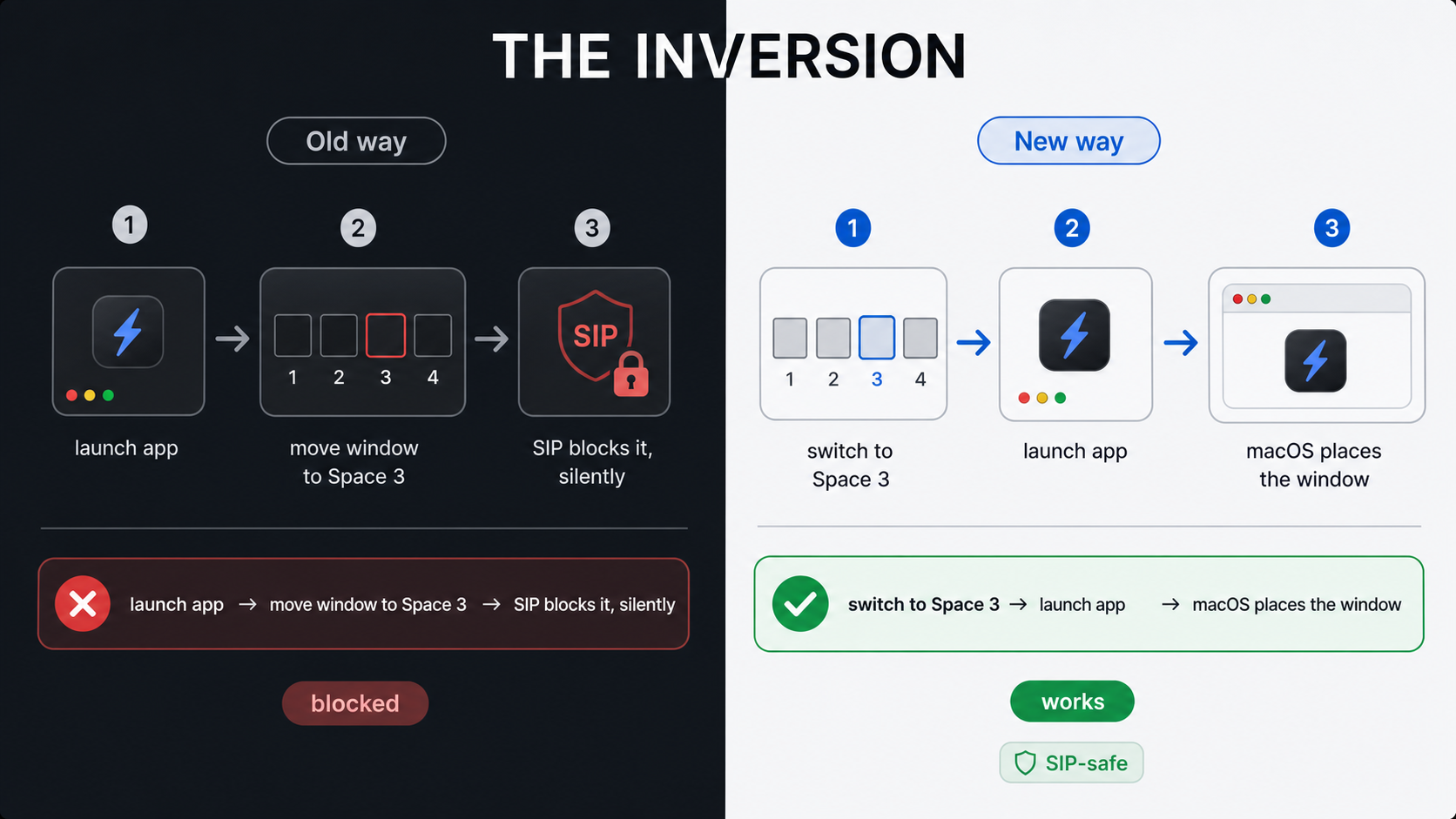
The file banner on SpaceConflictResolver.swift states the whole design in one comment:
//  Window movement IS legal on every supported macOS — but only via the
//  natural launch path (a window spawns on whichever space is active when
//  the process launches). Quit + relaunch lets us use that path without
//  needing private window-move APIs.
This turns a blocked private-API problem into a process-lifecycle problem. Process lifecycle is a domain where we have real, public tools: NSWorkspace.openApplication, NSRunningApplication.terminate(), PIDs, the Accessibility API. The rest of this post is the price we pay for that trade.
One write call: SLSManagedDisplaySetCurrentSpace
The inversion still needs one private call: something has to switch the active Space. That call is SLSManagedDisplaySetCurrentSpace, and it is the only write API in the entire app. What we can say is that it keeps working under SIP where the move APIs do not. Why that line falls where it does is a guess on our part, and the guess we like is that switching the visible Space is something the user can already do with a four-finger swipe, whereas re-parenting another process's window is not.
All SkyLight bindings live in one file, declared with @_silgen_name:
/// Get the main connection ID to the WindowServer.
@_silgen_name("SLSMainConnectionID")
func SLSMainConnectionID() -> Int32

/// Get the active space ID for a given managed display.
@_silgen_name("SLSManagedDisplayGetCurrentSpace")
func SLSManagedDisplayGetCurrentSpace(_ cid: Int32, _ display: CFString) -> UInt64

/// Switch the active space for a managed display.
@_silgen_name("SLSManagedDisplaySetCurrentSpace")
func SLSManagedDisplaySetCurrentSpace(_ cid: Int32, _ display: CFString, _ sid: UInt64)
There is no dlopen/dlsym dance and no bridging header full of externs. The linker resolves the symbols because the target links the private framework weakly:
FRAMEWORK_SEARCH_PATHS = ( "$(inherited)", /System/Library/PrivateFrameworks )
OTHER_LDFLAGS = ( "-weak_framework", SkyLight )
-weak_framework matters: symbols resolve lazily, so if a future macOS renames or removes something, the app still launches instead of dying in dyld. Every wrapper method checks mainConnectionID() != 0 and bails gracefully.
The bindings are never called directly from feature code. They sit behind a protocol:
/// Abstraction over SkyLight for testability.  The real implementation wraps
/// every SkyLight call in `ObjCExceptionCatcher`; the mock uses injectable stubs.
protocol SpacesService: AnyObject {
    func mainConnectionID() -> Int32
    func copyManagedDisplaySpaces() -> [[String: Any]]?
    func windowsForSpace(_ spaceID: UInt64) -> [UInt32]?
    func spacesForWindow(_ windowID: UInt32) -> [UInt64]?
    func spaceType(_ spaceID: UInt64) -> SpaceTypeValue
    func managedDisplayForSpace(_ spaceID: UInt64) -> String?
    func currentSpaceForDisplay(_ displayUUID: String) -> UInt64
    func setCurrentSpaceForDisplay(_ displayUUID: String, spaceID: UInt64)
}
RealSpacesService is the only type in the app that touches SkyLight, and every call goes through an Objective-C @try/@catch shim, because on macOS 15 some SkyLight calls throw exceptions instead of returning errors when they hit a SIP-protected process:
func setCurrentSpaceForDisplay(_ displayUUID: String, spaceID: UInt64) {
    let cid = mainConnectionID()
    guard cid != 0 else { return }

    do {
        try ObjCExceptionCatcher.catchException {
            SLSManagedDisplaySetCurrentSpace(cid, displayUUID as CFString, spaceID)
        }
    } catch {
        print("[SkyLight] SLSManagedDisplaySetCurrentSpace exception: \(error.localizedDescription)")
    }
}
MockSpacesService implements the same protocol with stub dictionaries and records every switch in recordedSpaceSwitches. The consequence is worth spelling out: a subsystem built entirely on undocumented WindowServer calls has deterministic unit tests that run with no window server at all.
A CFArray marshalling landmine
One hazard of undocumented C APIs is that nothing tells you the calling convention. Two functions in this same file take a CFArray and want opposite element encodings. SLSCopySpacesForWindows wants ordinary NSNumber elements. SLSCopyWindowsWithOptionsAndTags wants the integer values themselves cast to void* and stored as raw array elements:
// SLSCopyWindowsWithOptionsAndTags expects space IDs as raw integer values
// stored as void* elements in the CFArray (i.e. C-cast: (void *)spaceID).
// Passing NSNumber/CFNumber objects causes a crash because the function reads
// each array element as a raw UInt64, not as an Obj-C object.
var element: UnsafeRawPointer? = UnsafeRawPointer(bitPattern: UInt(spaceID))
guard let spaces = CFArrayCreate(kCFAllocatorDefault, &element, 1, nil) else { return nil }
We learned this by shipping the crash. The commit that fixed it is titled "Fix crash: pass space IDs as raw values not NSNumbers to SLSCopyWindowsWithOptionsAndTags."
Naming a Space you can sync across Macs
SLSManagedDisplaySetCurrentSpace takes a raw SkyLight Space ID, a large opaque integer like 3286 that changes across reboots and obviously means nothing on a different Mac. ShiftPlus syncs workspaces between Macs through CloudKit, so the persisted model can never contain one of those IDs.
The identity model is two-tier. What syncs is (display UUID, 1-based ordinal in Mission Control order):
/// Describes the window layout of a single macOS Space on a single display.
/// `displayIdentity` + `spaceIndex` uniquely address the Space on this Mac.
struct SpaceLayout: Codable, Hashable {
    /// Stable identity for the physical display. Currently the SkyLight display UUID.
    let displayIdentity: String
    /// 1-based index of this Space within the display's space list (Mission Control order).
    let spaceIndex: Int
    let spaceType: SpaceType
    let windowPlacements: [WindowPlacementRef]
}
The volatile IDs live only in a device-local map that is never synced:
/// Local-only mapping from display UUID to the current SkyLight space IDs on this Mac.
/// Stored in `DeviceOverlay` and never synced.
struct DeviceSpaceMap: Codable, Hashable {
    let displayUUID: String
    /// Maps 1-based space index → current SkyLight space ID.
    var spaceIDsByIndex: [Int: UInt64]
    var lastValidatedAt: Date
    var lastSeenSpaceCount: Int
}
At restore time, SpaceRestorer resolves ordinal to ID through the map, and if the lookup fails or returns 0, it rebuilds the whole map from a fresh SLSCopyManagedDisplaySpaces call and persists it. Stale maps self-heal; "Space 2" means "the second Space on this display, whatever its ID is today."
We know the raw IDs leak into user-visible places if you let them, because an early build did exactly that: it wrote the SkyLight ID into an app's assigned-desktop field, and users saw pills labeled "S3286" in the UI. The cleanup migration is blunt:
private func migrateLegacyDesktopIDs() -> Bool {
    let threshold = 100 // No Mac has anywhere near 100 user spaces
    var changed = false
    for pIdx in profiles.indices {
        if let d = profiles[pIdx].preferredDesktop, d > threshold {
            profiles[pIdx].preferredDesktop = nil
            changed = true
        }
        // … same for per-app preferredDesktop …
    }
    return changed
}
Any ordinal over 100 is assumed to be a stale raw ID and cleared. Belt-and-braces 1...64 range guards sit at every point where an ordinal is consumed.
One more enumeration detail: capture uses CGWindowListCopyWindowInfo with .optionAll, not the Accessibility API, because AX can only see windows on the currently active Space. Before that change, saving a workspace spread over three Spaces recorded correct placements only for the Space you happened to be looking at.
Already-running apps: quit and relaunch
Switch-then-launch works for apps we start. It does nothing for an app that is already running on the wrong Space, because there is no launch to hook. The only lever left is a restart: quit the app gracefully, switch the Space, launch it again. The new window is born in the right place.
That is a genuinely disruptive operation, so it is wrapped in consent and heuristics. Before proposing a relaunch, SpaceConflictResolver estimates how risky it is:
func detectUnsavedWork(_ app: NSRunningApplication) -> UnsavedIndicator {
    if hasEditedWindow(app) { return .definitelyUnsaved }
    if let bid = app.bundleIdentifier, knownStateful.contains(bid) { return .maybeUnsaved }
    if hasChildProcesses(app) { return .maybeUnsaved }
    return .clean
}
hasEditedWindow reads the AXEdited attribute on every window, which document-based apps set when there are unsaved changes. knownStateful is a hardcoded set of fourteen bundle IDs (terminals, Xcode, VS Code, Cursor, browsers) that hold meaningful state a quit would destroy even with nothing marked "edited." And hasChildProcesses walks the BSD process table via sysctl looking for anything whose parent is the app:
var name: [Int32] = [CTL_KERN, KERN_PROC, KERN_PROC_ALL, 0]
var length = 0
guard sysctl(&name, UInt32(name.count), nil, &length, nil, 0) == 0, length > 0 else {
    return false
}
let count = length / MemoryLayout<kinfo_proc>.stride
var buffer = [kinfo_proc](repeating: kinfo_proc(), count: count)
// … second sysctl fills the buffer …
for i in 0..<realCount {
    if buffer[i].kp_eproc.e_ppid == pid { return true }
}
A terminal with a running build has children. Quitting that terminal kills the build. We would rather flag it and let the user decide.
The relaunch itself is deliberately gentle:
// 1. Graceful terminate — opens the app's "save changes?" sheet if needed.
let started = app.terminate()
if !started { return .declined }

// 2. Wait up to `timeout` for the app to actually exit. If the user
//    clicks Cancel in the save sheet, the process stays alive — we
//    DO NOT escalate to forceTerminate. Respect their choice.
let didQuit = await waitForTermination(app, timeout: timeout)
if !didQuit { return .userCancelledQuit }

clearSavedStateIfStubborn(bundleID: conflict.bundleIdentifier)

// 4. Switch the target display to the target space so the new window
//    spawns there.
await switchToTargetSpace()
try? await Task.sleep(nanoseconds: 250_000_000)
Two empirical findings hide in there. First, the relaunch runs with NSWorkspace.OpenConfiguration().activates = true, because some of Apple's lightweight apps (Reminders, Calendar, Notes) launch headless when activates is false: the process starts, no window ever appears, and AX has nothing to place.
Second, clearSavedStateIfStubborn. A set of Apple apps use NSWindowRestoration so aggressively that quit-and-relaunch alone does not move them: the restored window goes back to its old Space regardless of which Space is active at launch. The workaround is to delete their saved-state directory before relaunching:
private func clearSavedStateIfStubborn(bundleID: String) {
    guard stubbornAppleApps.contains(bundleID) else { return }
    let path = ("~/Library/Saved Application State/\(bundleID).savedState" as NSString)
        .expandingTildeInPath
    guard FileManager.default.fileExists(atPath: path) else { return }
    try FileManager.default.removeItem(atPath: path)
}
The trade-off is documented in the source: the user loses cosmetic state like the last selected sidebar item and scroll position. The data itself lives elsewhere (Reminders' database, EventKit, CloudKit). This is not a fix you design; it is one you discover by shipping and watching Reminders ignore you.
The launch loop: ordering Space switches and app launches
With those pieces, the orchestrator in BrowserLauncher runs the whole restore. Two of its decisions are worth calling out.
PID-diff as the oracle. Before the conflict resolver runs, we snapshot bundleID → pid for every running app; afterwards we snapshot again. An app with the same PID in both snapshots was not relaunched and is still sitting on its old Space. Those apps must be skipped in the launch loop entirely:
// Snapshot bundle ID → PID *before* the conflict resolver runs so we
// can later distinguish:
//   • apps that were already running and stayed (same PID after
//     resolution) — these are still on their pre-launch Space; we
//     MUST NOT call NSWorkspace.openApplication on them in the per-
//     space loop below, because macOS Sequoia's default "switch to
//     Space with open windows" behaviour will yank the display to
//     wherever those windows live, defeating the entire flow.
That comment describes the failure mode exactly. On Sequoia, activating a running app makes macOS jump the display to that app's windows. Re-activate one untouched app mid-restore and the display yanks away from the Space you just switched to, and everything launched after that lands in the wrong place. The PID diff cleanly partitions apps into fresh launches, resolver-relaunched apps (new PID, already on the right Space), and untouched running apps (skip).
Descending Space iteration. Many users have "Automatically rearrange Spaces based on most recent use" enabled, which reorders Mission Control behind your back. Rather than demanding they turn it off, the loop visits Spaces from highest ordinal to lowest:
// Visit spaces high→low so macOS auto-rearrange ("mru-spaces") produces the
// correct Mission Control order [1, 2, 3] when we finish on the primary space.
// Ascending order (1→2→3→1) causes MRU to promote the last-visited non-primary
// space, swapping its visual position in Mission Control.
let spaceIndices = Set(appsBySpace.keys)
    .union(browserGroupsBySpace.keys)
    .union([primaryIndex])
    .sorted(by: >)
Ending on the lowest-index Space means the MRU reordering, if it fires, produces the order we wanted anyway.
Per Space, the loop switches, launches that Space's apps concurrently with all placement fields stripped (so the launch path schedules no async timers), polls AX until every launched app has at least one window (up to 4 seconds, because a slow Xcode that spawns its windows after we have moved on puts them on the wrong Space), then applies saved window frames synchronously while still standing on the correct Space. Frames are applied only to apps we launched; touching a skipped app's window would mutate a window sitting on some other Space.
The compositor doesn't repaint: forcing kCGSSpaceDidChange
After all of that worked, we hit the strangest bug in the project: the restore completed correctly, and the screen did not change. Mission Control showed windows on their new Spaces. The visible desktop was frozen on whatever the user had been looking at.
The explanation is at the top of DockSwipeRefresher.swift:
//  Why we need this: `SLSManagedDisplaySetCurrentSpace` mutates WindowServer
//  state but does NOT fire `kCGSSpaceDidChange` on macOS 15+. The Dock — not
//  WindowServer — owns that notification. Going through the Dock's normal
//  trackpad-swipe pipeline triggers the notification and forces a real
//  compositor repaint.
On macOS 15, the Space-change notification that drives the visible transition belongs to the Dock's gesture pipeline, not to WindowServer. Our SLS call mutates the state underneath, and nothing tells the compositor to care.
The fix is to synthesize the gesture. A trackpad Space-swipe is a CGEvent with a set of undocumented integer fields. We did not work those indices out ourselves; they come from prior art, principally joshuarli's iss (see iss.c) and jurplel's InstantSpaceSwitcher, with BetterTouchTool's behavior as a cross-check:
private static let kCGSEventTypeField            = CGEventField(rawValue: 55)!
private static let kCGEventGestureHIDType        = CGEventField(rawValue: 110)!
private static let kCGEventGestureScrollY        = CGEventField(rawValue: 119)!
private static let kCGEventGestureSwipeMotion    = CGEventField(rawValue: 123)!
private static let kCGEventGestureSwipeProgress  = CGEventField(rawValue: 124)!
private static let kCGEventGestureSwipeVelX      = CGEventField(rawValue: 129)!
private static let kCGEventGesturePhase          = CGEventField(rawValue: 132)!
private static let kCGEventScrollGestureFlagBits = CGEventField(rawValue: 135)!
private static let kCGEventGestureZoomDeltaX     = CGEventField(rawValue: 139)!

private static let kCGSEventGesture: Int64       = 29
private static let kCGSEventDockControl: Int64   = 30
private static let kIOHIDEventTypeDockSwipe: Int64 = 23
Building the event is mostly filling those fields, with one detail that cost real debugging time:
private func makeDockEvent(phase: Int64, right: Bool) -> CGEvent? {
    guard let ev = CGEvent(source: nil) else { return nil }
    ev.setIntegerValueField(Self.kCGSEventTypeField,            value: Self.kCGSEventDockControl)
    ev.setIntegerValueField(Self.kCGEventGestureHIDType,        value: Self.kIOHIDEventTypeDockSwipe)
    ev.setIntegerValueField(Self.kCGEventGesturePhase,          value: phase)
    ev.setIntegerValueField(Self.kCGEventScrollGestureFlagBits, value: right ? 1 : 0)
    ev.setIntegerValueField(Self.kCGEventGestureSwipeMotion,    value: Self.kCGGestureMotionHorizontal)
    ev.setDoubleValueField(Self.kCGEventGestureScrollY,    value: 0)
    // FLT_TRUE_MIN — required magic value (joshuarli/iss). Setting 0 here
    // causes the Dock to silently drop the event.
    ev.setDoubleValueField(Self.kCGEventGestureZoomDeltaX, value: Double(Float.leastNonzeroMagnitude))
    return ev
}
The zoom-delta field must be FLT_TRUE_MIN, the smallest positive subnormal float. Set it to zero and the Dock silently ignores the event. There is no principled reason we know of; it is simply what the Dock's filter requires, and one more instance of "fails silently" in this story. Each Dock event is also posted with a companion type-29 gesture event, because the Dock's pipeline expects them as a pair.
We do not actually want to change Spaces here, only to fire the notification. So the nudge posts a full swipe right followed by a full swipe left: net Space change zero, kCGSSpaceDidChange fires twice, compositor repaints, and the desktop the user sees finally matches WindowServer's state. Only the End event of each swipe carries momentum (progress = ±2.0, velX = ±400.0).
Multi-monitor setups add a wrinkle: the repaint only happens on the display under the cursor. So the nudge warps the cursor to the center of each display in turn, waits 40 ms for WindowServer to associate events with that display, posts the pair, and restores the cursor when done. The whole thing is gated behind #available(macOS 15.0, *), because Sonoma's compositor still repaints on the SLS call natively and the synthetic swipe would cause a visible double-flash there. There is also an escape hatch for the day a macOS update changes the Dock's filtering:
defaults write com.nghialuong.shiftplus SP_DisableDockSwipeRefresh -bool YES
All of this uses public CGEvent API and requires only the Accessibility permission the app already holds. No SIP involvement.
Keeping it honest: a grep test that guards the architecture
The failure mode we are most afraid of is quiet regression: some future refactor, or some future us, re-introducing a window-move API because it works on the dev machine. So the test suite contains a test that greps the source tree:
func testNoSLSMoveCallsInCodebase() throws {
    let banned = ["SLSMoveWindowsToManagedSpace",
                  "SLSAddWindowsToSpaces",
                  "SLSRemoveWindowsFromSpaces",
                  "SLSSpaceSetCompatID",
                  "SLSSetWindowListWorkspace"]
    // … enumerate every .swift file under BrowserProfileManager/ …
    for case let url as URL in enumerator where url.pathExtension == "swift" {
        guard let text = try? String(contentsOf: url, encoding: .utf8) else { continue }
        // Strip simple // comments before grepping so the explanatory
        // comments left in SkyLightAPI.swift / SpacesManager.swift /
        // BrowserLauncher.swift are ignored.
        let stripped = text
            .components(separatedBy: .newlines)
            .map { line -> String in
                if let commentRange = line.range(of: "//") {
                    return String(line[line.startIndex..<commentRange.lowerBound])
                }
                return line
            }
            .joined(separator: "\n")

        for bannedSym in banned where stripped.contains(bannedSym) {
            offenders.append("\(url.lastPathComponent) → \(bannedSym)")
        }
    }
    XCTAssertTrue(offenders.isEmpty,
                  "Found references to removed SLS move APIs:\n\(offenders.joined(separator: "\n"))")
}
It strips // comments line by line before scanning, so the explanatory tombstone comments survive while any real re-introduction of the five banned symbols fails CI. It is a crude tool for an architectural constraint, and it has the property we care about most: it cannot be forgotten.
What this design costs: the trade-offs
Being honest about the limits:
- Private APIs can still break. We reduced the surface to one write call plus a handful of reads, weak-linked and exception-wrapped so failure degrades to "Spaces restore didn't happen" rather than a crash. But
SLSManagedDisplaySetCurrentSpaceis not a contract, and a future macOS could restrict it the way it restricted the move APIs. If that happens, the read paths and the quit-and-relaunch machinery survive; the automatic switching does not. - No Mac App Store. Private framework linkage rules that out. Deliberate trade, but a trade.
- Quit-and-relaunch is disruptive. It is the honest cost of not moving windows. We surface it in a dialog, detect unsaved work three different ways, and never escalate past a graceful
terminate(), but a restart is still a restart. - Stage Manager breaks the model. It replaces Spaces semantics entirely; ordinal-based restore is unreliable under it.
- The ordinal model assumes Mission Control order.
SLSCopyManagedDisplaySpacesreturns Spaces in an array, and we treat array order as Mission Control order. The descending-iteration trick absorbs MRU rearrangement during a restore, but "Space 2" is ultimately a positional claim, not a named one. - Timing constants are empirical. The 250 ms and 300 ms settles after each switch, the 4-second window-spawn poll: these are measured values, not guarantees, and slow apps on slow machines can still race them.
We think that is a reasonable ledger. The alternative designs either require users to disable a core OS security feature or silently do nothing on the OS most of them run.
Frequently asked questions
Does ShiftPlus require disabling System Integrity Protection?
No. ShiftPlus restores apps to the correct macOS Space on a stock, SIP-enabled Mac. It does not rely on any window-move API that requires SIP to be disabled. The only private SkyLight call it makes — SLSManagedDisplaySetCurrentSpace — switches the active Space, not a window, and continues to work with SIP enabled on macOS 15 Sequoia and macOS 26 as of July 2026.
Can you move a window to another macOS Space without disabling SIP?
Not directly via private APIs, as of macOS 15 and macOS 26. The SkyLight window-move APIs (SLSMoveWindowsToManagedSpace, SLSAddWindowsToSpaces, SLSSpaceSetCompatID) all fail silently with SIP enabled — no error, no exception, no movement. The approach that works: switch the target Space active first with SLSManagedDisplaySetCurrentSpace, then launch the app. New windows always open on whichever Space is currently active, so the window is born in the right place without ever being moved.
What is SLSManagedDisplaySetCurrentSpace and why does it still work under SIP?
SLSManagedDisplaySetCurrentSpace is a private SkyLight framework function that changes which Space is active on a given display — the same action a four-finger swipe performs. Our best guess for why it survives SIP restrictions where the window-move APIs do not: switching the visible Space is something the user can already do without elevated privileges, whereas re-parenting another process's window cannot. It is not a documented contract, so it could change, but it has worked consistently across macOS 15 and macOS 26 in our testing.
Why does yabai need SIP partially disabled but ShiftPlus does not?
The SIP requirement for yabai covers a different capability set — specifically, loading a scripting addition into the Dock to enable window shadows, transparency, creating and destroying Spaces, and sticky windows. The core window-placement approach both tools ultimately use (make a Space active, then let macOS place the new window there) does not require disabling SIP.
What is the quit-and-relaunch approach for macOS Spaces?
For apps already running on the wrong Space, ShiftPlus quits the app gracefully, switches the target Space active, then relaunches the app. Because every new window opens on the currently active Space, the relaunched app's window lands in the right place. Before proposing a quit, ShiftPlus checks for unsaved changes (AXEdited), known stateful apps (terminals, Xcode, VS Code), and child processes (e.g. a running build). It never escalates past a graceful terminate() — if the user clicks Cancel in a save dialog, the quit is abandoned.
What happens if SLSManagedDisplaySetCurrentSpace stops working in a future macOS version?
ShiftPlus weak-links SkyLight (-weak_framework SkyLight) so that if a future macOS renames or removes the symbol, the app still launches instead of crashing in dyld. Every call is wrapped in an Objective-C @try/@catch block. If the call is restricted, the failure mode is "Spaces restore skips that Space" — not a crash. The quit-and-relaunch infrastructure, window-frame restore, and browser-profile launch logic all continue to work independently.
If you want to see the result, the Spaces restore in ShiftPlus is the shipping version of everything above, and we wrote up how the other macOS workspace managers approach the problem separately. And if you know something about the Dock's gesture filter that explains FLT_TRUE_MIN, we would genuinely like to hear it.