5 Stay Alternatives for Mac in 2026 (Window Memory and Beyond)
Stay by Cordless Dog remembers your window positions per display — but if you want workspace-level context (apps, Spaces, browser profiles), you need something more. Honest comparison of the best Stay alternatives for Mac.
If you've searched "Stay app alternative," you're probably in one of two situations: you want something functionally similar to Stay by Cordless Dog with a different maintenance profile, or you've hit Stay's ceiling and realized that remembering window positions isn't actually the bottleneck — you want your whole context back: apps, macOS Spaces, browser profiles, project state. These are genuinely different problems, and the tools that solve them are different too.
This post covers both honestly.
TL;DR
Stay (by Cordless Dog) remembers which window was on which display in which position and restores those arrangements when your display configuration changes. It is a deliberately narrow window-position memory tool — it does not launch apps, switch browser profiles, or manage macOS Spaces. People look for alternatives because of questions around development cadence, or because they've outgrown window memory and need full workspace context.
ShiftPlus does what Stay and every other window-memory tool cannot: it saves your full workspace context — open apps, browser profiles, macOS Spaces placement, terminal environment — and restores it on demand with one hotkey, even after a restart. For pure window-position memory, Moom's layout snapshots or macOS's own "Reopen windows when logging back in" cover the basics without any additional purchase.
Need Best pick Automatic window memory per display config Stay (check developer site for current status) Basic session restore, no extra install macOS "Reopen windows when logging back in" (free) Layout snapshots + polished window snapping Moom ($9.99) Custom snap zones, precision geometry Rectangle Pro ($9.99) Trackpad-friendly snapping at low cost BetterSnapTool ($2.99) or Magnet ($4.99) Full workspace restore (apps + Spaces + browser profiles) ShiftPlus ($24 / $39)
What Stay actually does well
Stay is built around a narrow and genuinely useful premise: when you reconnect your external display, your windows should be where you left them. Connect a MacBook to a two-monitor desk setup and Stay restores the exact window arrangement you had the last time you used that display configuration — automatically, without a hotkey.
This per-display-configuration window memory is Stay's core feature. If you frequently move between a desk setup and working from the laptop screen alone, Stay removes the friction of manually dragging windows back where they belong on every reconnect. You can also trigger a manual restore at any time via a keyboard shortcut, and Stay operates per application — it only repositions windows it remembers, leaving anything new untouched.
What Stay does not do:
- Launch apps that have quit. If you've closed an app, Stay has nothing to restore for it.
- Manage browser profiles. Stay is profile-unaware; it sees a browser window as a set of coordinates, not as a specific account context.
- Touch macOS Spaces or virtual desktops. Stay does not assign apps to Spaces or restore Spaces assignments after switching.
- Survive a full restart cleanly. Stay restores windows that are already open. It does not bring apps back from zero after a reboot.
- Understand named projects or contexts. Stay has no concept of "I'm in Client A mode" versus "I'm in Client B mode."
If you've hit one of those limits, you've outgrown Stay's category, not necessarily Stay the app. The tools that cover those gaps are workspace managers, not window-position managers — and understanding that distinction is the most useful thing this post can give you before the comparison.
The 5 alternatives
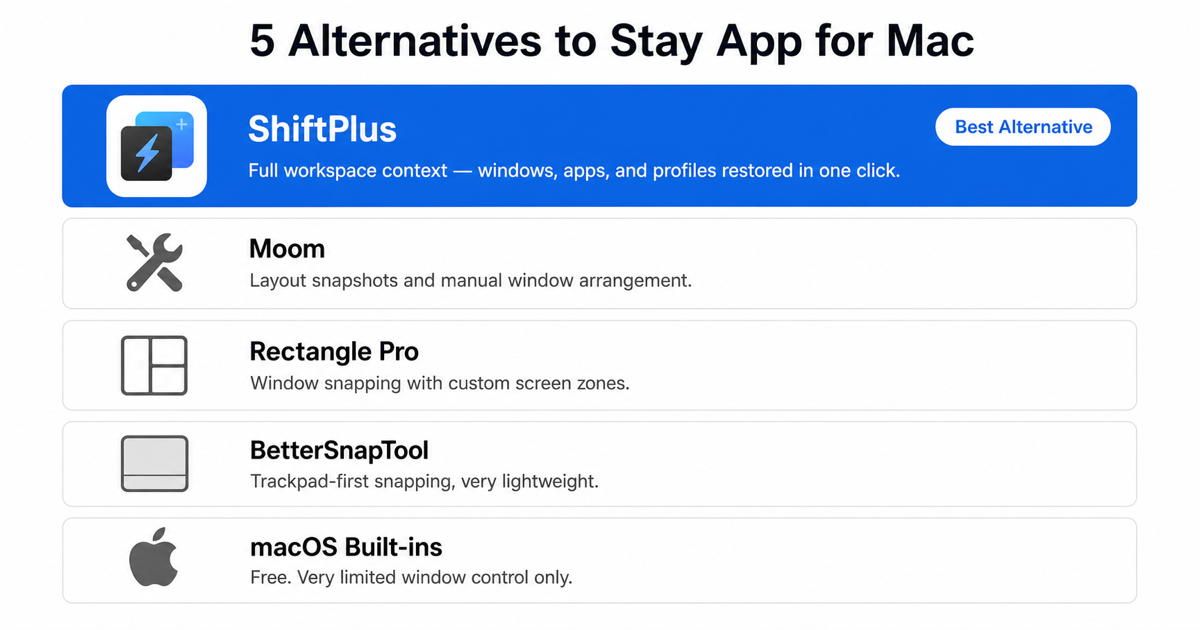
1. ShiftPlus — full workspace context
ShiftPlus operates at the layer above window-position memory. Rather than remembering window coordinates, it saves the entire working context for a named project and rebuilds it from scratch on demand — after a restart, after switching projects, or after moving between Macs.
A ShiftPlus workspace defines:
- Which apps to launch — and which to close or hide when you switch away from that workspace
- Which browser profile to activate — if you work with two clients who both use Google Workspace, the "Client A" workspace opens Chrome to Client A's profile with separate cookies, logins, and extensions; switching to "Client B" swaps the entire browser context, not just tabs
- Which URLs to open — deeplinks into Slack channels, VS Code projects, Linear views, Spotify playlists — not just raw URLs
- Terminal environment variables —
AWS_PROFILE,NODE_ENV, custom vars set automatically on workspace switch, no manualexportrequired - macOS Space placement — each app can be assigned to a specific Space; ShiftPlus moves everything into position on restore without any manual dragging
Restoring a workspace with ShiftPlus means pressing one global hotkey. The previous project's apps close or hide, the new ones launch and arrange themselves, the browser profile switches, the URLs load — typically in a few seconds.
Pricing: $24 one-time for one Mac; $39 one-time for two Macs with iCloud sync. 14-day full-feature trial, no credit card required.
Best for: Anyone who switches between multiple projects, clients, or work contexts and loses time rebuilding their setup from scratch on every switch. If rebuilding your environment after a restart is the problem, this is the right category of tool.
See the best macOS workspace manager comparison for 2026 for how ShiftPlus stacks up against other workspace-level tools like Spencer, Workspaces, and Ikuna.
2. Moom — layout snapshots and window arrangement
Moom ($9.99) is the closest traditional window manager to what Stay does conceptually: it can save a snapshot of your current window positions and re-apply them later with a keyboard shortcut. The saved layout records which position each window is in, so if you have a regular working arrangement, you can restore it after moving windows around mid-session.
Moom's layout recall is manual — you trigger it — rather than Stay's automatic trigger on display reconnect. Moom also doesn't tie layouts to display configurations the way Stay does. But Moom adds considerably more on top: a custom grid editor for non-standard column ratios, keyboard-shortcut snapping for halves, thirds, quarters and corners, and the distinctive hover-menu zoom button on window title bars.
Moom's ceiling matches Stay's at the fundamental level: it repositions windows that are already open. It launches nothing, doesn't know about browser profiles, and doesn't touch macOS Spaces assignments.
Best for: Users who want Stay-like layout recall plus full-featured keyboard snapping, and prefer a one-time manual trigger over automatic restoration. Also good for single-display users who don't need Stay's display-configuration awareness.
For a detailed breakdown of Moom and seven of its alternatives, see the Moom alternative guide.
3. Rectangle Pro — window snapping with custom zones
Rectangle Pro ($9.99) is the paid upgrade to the popular free Rectangle snapper, from the same developer. It adds custom snap zones — draw arbitrary screen regions as snap targets — window cycling between preset positions, and multi-step keyboard shortcuts.
Rectangle Pro doesn't offer Stay's per-display layout memory or Moom's named layout snapshots. Its strength is precision snap geometry: if you need a 65%/35% split, a narrow sidebar column, or an ultrawide-optimized three-pane layout, Rectangle Pro lets you draw that zone once and snap to it with a keystroke thereafter. The free version of Rectangle covers all the standard halves, thirds, quarters, and corners without spending anything.
Best for: Users who want precise custom snap zones within a session and don't need automatic window restoration. Rectangle Pro pairs naturally with ShiftPlus — Rectangle Pro handles snap geometry within a session; ShiftPlus handles context switching between sessions.
See the Rectangle alternative guide for a deeper look at when snapping tools hit their ceiling and what comes after them.
4. BetterSnapTool / Magnet — trackpad-first snapping
BetterSnapTool ($2.99) and Magnet ($4.99) cover the keyboard-shortcut and drag-to-snap end of the spectrum at a lower price point than Moom or Rectangle Pro.
BetterSnapTool from the BetterTouchTool developer allows fully custom snap zones — draw arbitrary screen regions as drag targets. It chains with BetterTouchTool gestures, so you can trigger snapping from trackpad swipes or multi-finger gestures. Particularly practical for multi-monitor setups with unconventional proportions, like an ultrawide paired with a portrait secondary.
Magnet is the most-downloaded paid window manager on the Mac App Store. Its drag-to-snap responsiveness is its main selling point — pulling a window to a screen edge feels immediate, which matters on a trackpad-centric workflow. It covers halves, thirds, quarters, sixths, and fullscreen with no configuration. Sandboxed (App Store requirement), which means it plays well in managed environments.
Neither offers layout memory, display-configuration recall, or any concept of workspace context. They snap windows cleanly and stop there.
Best for: Anyone who wants trackpad-friendly snapping at a low one-time cost. Not a functional replacement for Stay's core display-config window memory — more of a complement (snapping within a session) or a lateral move if drag-to-snap is what you actually needed.
5. macOS built-ins — free before you spend anything
Before reaching for a third-party tool, macOS offers two relevant built-in features worth evaluating:
"Reopen windows when logging back in" — when you restart your Mac and leave this option checked at shutdown, macOS attempts to restore the apps and windows that were open. It works adequately for simple setups, though reliability drops for complex multi-window arrangements, it doesn't survive crash reboots, and it has no concept of named layouts, display configurations, or project contexts.
Stage Manager (macOS Ventura and later) — a native windowing mode that groups open apps into sets and lets you switch between them from a sidebar. Stage Manager is not a workspace manager: it doesn't launch apps that aren't running, doesn't restore browser profiles, and doesn't manage Spaces assignments. For a shallow single-project workflow it may provide enough grouping. For anything multi-project, it isn't close.
Both are worth enabling to see how far they get you before evaluating paid options. If they meet your needs, you're done. If they don't, the gap tells you something concrete about what category of tool you actually need.
Best for: Light users with simple setups and a single active project. Free by definition.
Comparison table
| Tool | Remembers window positions | Restores across Spaces/desktops | Launches apps + browser profiles | One-time price |
|---|---|---|---|---|
| Stay | ✅ per display config | ❌ | ❌ | Check developer site |
| Moom | ✅ manual recall | ❌ | ❌ | $9.99 |
| Rectangle Pro | ❌ | ❌ | ❌ | $9.99 |
| BetterSnapTool | ❌ | ❌ | ❌ | $2.99 |
| Magnet | ❌ | ❌ | ❌ | $4.99 |
| macOS built-ins | Partial (unreliable) | ❌ | Partial (unreliable) | Free |
| ShiftPlus | ✅ per workspace | ✅ | ✅ | $24 / $39 |
Which one should you pick?
You want to replace Stay's display-config window memory: Start with macOS's "Reopen windows when logging back in" — it handles basic session restore at zero cost. If you need reliable per-display layout memory with a manual trigger, Moom's layout snapshots get close and add full window snapping on top. If you specifically need automatic restore on display reconnect, check the Cordless Dog website directly for Stay's current status — that feature is Stay's unique value and no other tool in this list replicates it identically.
You want window snapping, not window memory: Rectangle (free) covers the core use case. Rectangle Pro for custom snap zones. Magnet if you want the most polished drag-to-snap feel on a trackpad. BetterSnapTool for custom zones plus BetterTouchTool gesture chains. All are one-time purchases under $10; none require a subscription.
You've hit Stay's ceiling and want workspace context: ShiftPlus. Stay, Moom, Rectangle Pro, Magnet, and BetterSnapTool all share the same fundamental boundary: they reposition windows that are already open. If you lose time rebuilding your project setup after a restart, after switching projects, or after moving to a different Mac, the problem lives above the window layer. ShiftPlus saves the full context — apps, browser profiles, Spaces, terminal env — and restores it from zero. That's a different category of tool, not a better window manager.
You want both snapping and workspace context: Run Rectangle (free) alongside ShiftPlus. They don't conflict — ShiftPlus handles context switching at the workspace level; Rectangle handles individual window geometry within a session. Many users run exactly this combination: ShiftPlus brings the workspace back, Rectangle tidies windows within it.
FAQ
Is Stay still maintained?
The current development and maintenance status of Stay by Cordless Dog is best verified directly on the developer's website at cordlessdog.com/stay. Rather than asserting a status here that may become outdated, check the developer's site for the latest release history, version notes, and any official statements about the app's availability.
What's the difference between Stay and a workspace manager?
Stay is a window-position manager: it remembers where your windows sit on each display and restores those positions when the display configuration changes. A workspace manager like ShiftPlus operates at a higher level — it saves which apps should be running, which browser profile is active, which URLs are loaded, how things are arranged across macOS Spaces, and rebuilds that entire context on demand. Stay can't help when apps have quit; ShiftPlus launches them. Stay has no concept of named project environments; ShiftPlus switches between them. For more on why Mac doesn't remember window positions across sessions, see the Mac window position memory guide.
Can ShiftPlus restore window positions like Stay does?
Yes — window placement is part of what ShiftPlus saves per workspace. When you switch to a workspace, ShiftPlus launches the configured apps, activates the browser profile, and places each window in its assigned position and macOS Space. The difference from Stay is that ShiftPlus performs this as part of full workspace restoration (rebuilding from zero, including after a restart), tied to a named project context rather than a display configuration. It doesn't automatically trigger on monitor reconnect the way Stay does, but it does restore window positions as part of every workspace switch.
Do any Stay alternatives work across virtual desktops (Spaces)?
Of the tools in this comparison, only ShiftPlus manages macOS Spaces assignments. Standard window managers — Stay, Moom, Rectangle Pro, Magnet, BetterSnapTool — operate within the current Space and do not move apps between virtual desktops. ShiftPlus assigns each app to a specific Space when restoring a workspace, so your code editor lands on Space 1, communication apps on Space 3, and so on, without manual dragging. The best macOS workspace manager guide covers this capability across the major tools in the category.
ShiftPlus is free to try for 14 days — no credit card required. Download the trial to see whether workspace-level switching solves the context problem that window-position memory can't.